ConvertKit vs Drip: the price gap widens fast as your list grows
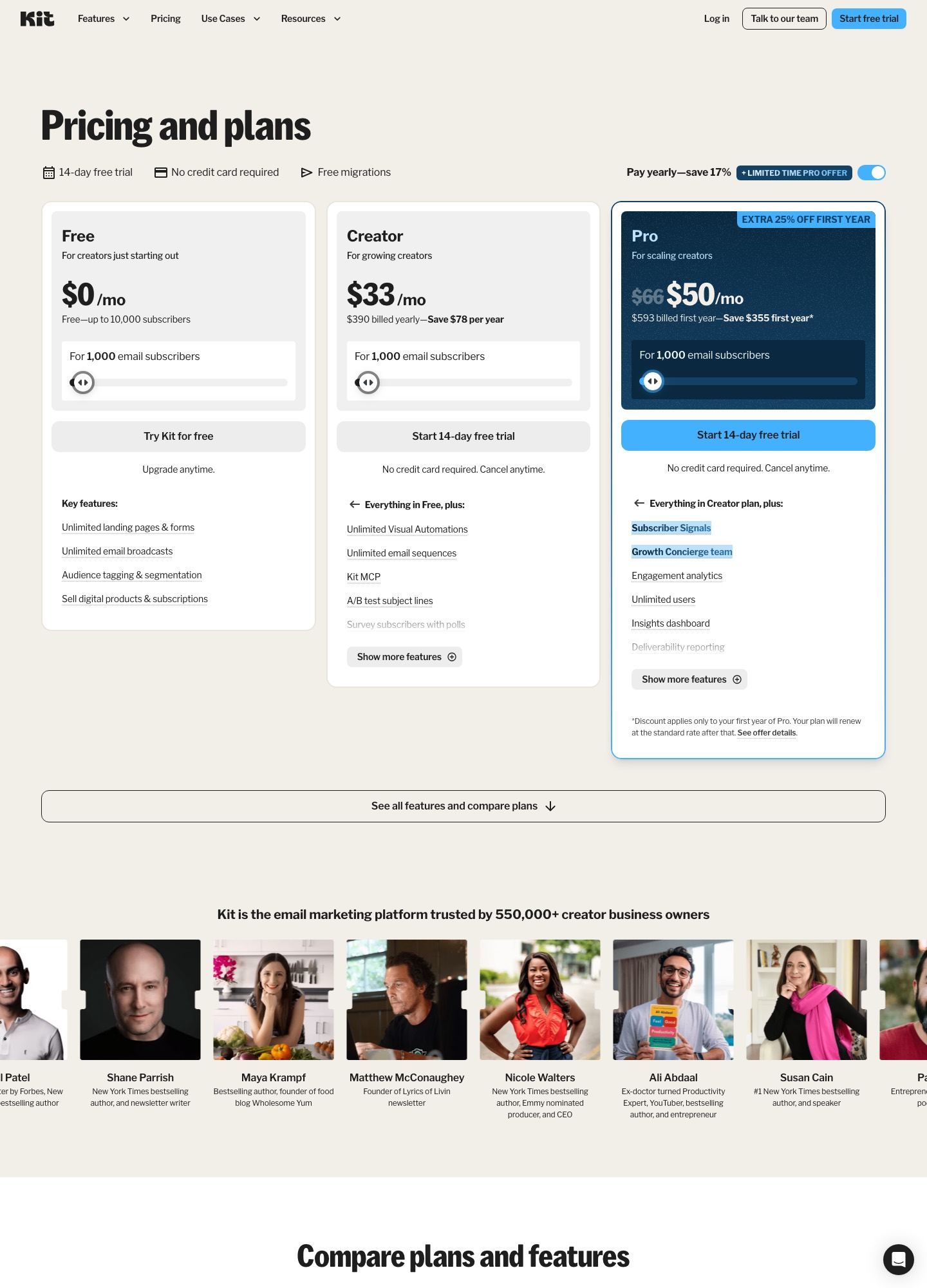
Kit (formerly ConvertKit) charges $75 a month for 5,000 subscribers and Drip charges $89 for 5,000 people. At 10,000 it is $116 against $154, and at 25,000 it is $166 against $369. Drip earns its premium in ecommerce and billing events: it records Stripe charges, failed payments and refunds, while Kit's Stripe app skips refunds and failed payments. Kit also keeps broadcasts free up to 10,000 subscribers.
By Julian Pryor · Updated 7 Oct 2026
Short answer
Choose Kit if you run a newsletter, course or digital-product business and want the lower bill: Creator is cheaper at every size where both publish a price. Choose Drip if your revenue events come from a store or from Stripe and you want those events, failed payments included, to start automations. A creator with 10,000 subscribers saves $38 a month on Kit, and a SaaS founder who needs payment-failed handling may find Drip's $154 reasonable.
Price by list size
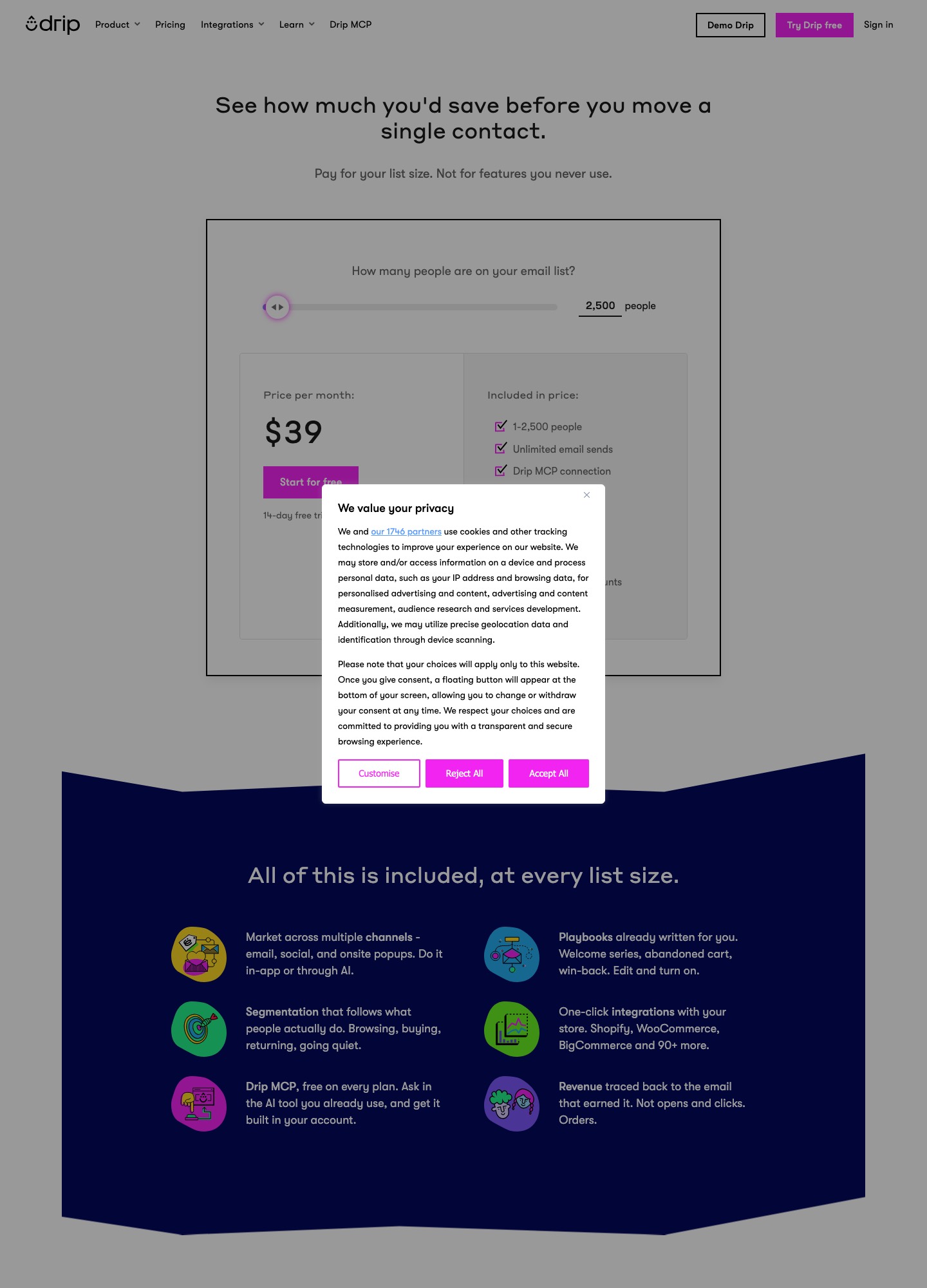
Kit's rows come from its slider on 7 October 2026 and are the monthly equivalents under its yearly-billing toggle. Drip's rows are its slider readouts on the same day, where the page says cost is set by the active people in your account and the emails you send in the month. Drip's lowest band covers 1 to 2,500 people, so the 1,000 row uses it.
| People on the list | Kit Creator | Kit Pro | Drip | Drip minus Kit Creator |
|---|---|---|---|---|
| 1,000 | $33 | $66 ($50 first-year offer) | $39 | $6 |
| 5,000 | $75 | No readout | $89 | $14 |
| 10,000 | $116 | $158 | $154 | $38 |
| 25,000 | $166 | $233 | $369 | $203 |
Drip's other readouts: $49 at 3,000, $124 at 7,500, $209 at 15,000, $289 at 20,000, $449 at 30,000, $609 at 40,000 and $699 at 50,000. Over a year the Drip premium over Kit Creator is $168 at 5,000 (14 times 12), $456 at 10,000 and $2,436 at 25,000. Kit Pro is the closer match for Drip's feature depth, and against Pro, Drip is $4 cheaper at 10,000 (158 minus 154) while Pro is $136 cheaper at 25,000 (369 minus 233).
What the free and entry options leave out
Kit's Free plan is broad on audience tools: unlimited landing pages, forms and broadcasts, tagging and segmentation, and selling digital products and subscriptions, up to 10,000 subscribers. What it leaves for Creator is Visual Automations, unlimited sequences, A/B subject lines and branding removal. Drip has no free plan, only a 14-day trial, but its cheapest band already includes dynamic segments, onsite campaigns and up to 50 workflows, and that $39 band stretches to 2,500 people, where Kit Creator's $33 is quoted for 1,000.
Drip's pricing page also describes ready-made playbooks (welcome series, abandoned cart, win-back), one-click store integrations and revenue traced back to the email that earned it. Kit's selling points are the creator toolkit above, and Pro adds unlimited users, subscriber signals, deliverability reporting and a newsletter referral system.
How each handles Stripe events
This is where Drip's price shows up as capability. Per Drip's help article on Stripe, it receives Stripe webhooks that you register, adds the customer to Drip if they are missing, records an event for that person and updates their lifetime value on charge events. It records purchases going forward and does not pull history. The integration page gives examples of tagging a subscriber on a completed payment, enrolling someone in a recovery campaign when a payment attempt fails, and removing a tag on a refund, partial ones included. For anything custom, Drip's API has a Record an Event call (POST /v2/:account_id/events) that creates the subscriber if needed, plus a batch call for up to 1,000 events.
Kit's Stripe app turns buyers into subscribers and logs payments in a Purchases tab, including subscriptions and imported purchase history. It does not support refunds, a Stripe purchase becomes an automation entry point only after a test purchase has been made, and Kit's troubleshooting guide names charge succeeded and subscription updated as the events it watches. When Stripe cannot identify the product, the purchase lands on a fallback named Stripe Payment.
For a SaaS product that means a trial-expired or payment-failed message needs your own handler on Kit, setting a tag through the Kit API, whereas on Drip the failed attempt is a documented use of the integration. Either way, decide whether Stripe's own customer emails or your marketing tool owns the dunning message so one failure does not trigger two.
Pricing details that move the number
- Billing term. Kit's slider defaulted to yearly billing, and its page says paying yearly saves 17%, while Drip's readouts carry no term. If you pay month to month on Kit, the gap to Drip narrows from the figures above.
- The Pro offer. Kit's Pro at 1,000 subscribers shows $50 against $66, with a footnote saying the discount applies only to the first year and the plan then renews at the standard rate. Budget for $66, not $50.
- What Drip counts. Its page says cost follows active people and the volume of emails sent in the month, so a busy product-update month can matter as much as list growth. Kit counts subscribers.
- Send ceilings. From the 37,501-person tier Drip lists a fixed send count, 480,000 at 40,000 people and 600,000 at 50,000, which is 12 emails per person a month.
A trial-to-paid funnel on each
Take 5,000 trial users and four lifecycle flows: onboarding, trial ending, failed payment and win-back. On Drip that is $89 a month and four of the up to 50 workflows listed for that tier, so the workflow ceiling is not a constraint for a SaaS product. On Kit it is $75 on Creator, where automations and sequences are unlimited. The difference is how the triggers arrive. Drip's event model takes a custom event with an email and an action name, so Trial Ending and Payment Failed can be named for what they are. On Kit you would hold the same states as tags and custom fields, with the tag as the automation entry point, which is simpler to read in a list view and less precise as data.
Moving between them
- Export subscribers with tags and custom fields, and keep unsubscribed and bounced addresses in a separate file to load as inactive.
- Kit's pricing page advertises free migrations, and Drip's 25,000-person tier lists free migration and personalised onboarding, so ask for the vendor's help before doing it by hand.
- Because Drip does not backfill Stripe history, export your charge and subscription data first if lifetime value matters in the new account.
- Run both for one billing cycle and cut over sequence by sequence, watching that no subscriber gets a welcome series twice.
Which to choose
- Kit fits a creator or small publisher whose list is the product, especially under 10,000 subscribers where broadcasts cost nothing.
- Drip fits a store or subscription business that wants payment events, lifetime value and workflows in one place and accepts paying about $38 a month more at 10,000.
- Reconsider both past 25,000 contacts if your messages come mostly from product events; tools priced by profile, such as Customer.io, are built for that.
Related reading: all comparisons, ActiveCampaign vs Drip, Klaviyo vs Drip, Omnisend vs Drip, Encharge vs Drip and Customer.io vs ConvertKit.
ConvertKit vs Drip: common questions
How much more does Drip cost than Kit at 25,000 contacts?
On the figures read from each pricing page on 7 October 2026, Drip is $369 a month at 25,000 people and Kit Creator is $166 at 25,000 subscribers, a gap of $203 a month or $2,436 a year (203 times 12). Kit's number is its yearly-billing rate; its month-to-month rate is higher and was not in the page text I read, so treat the gap as the yearly-billing gap.
Does Drip have a free plan?
No. Drip's pricing page offers a 14-day free trial with no credit card and shows no ongoing free tier. Kit's Free plan runs up to 10,000 subscribers with unlimited broadcasts, forms and landing pages, though Visual Automations and sequences start on Creator.
Which one reacts to a failed Stripe payment?
Drip's Stripe integration page lists subscribing someone to a cart recovery campaign when a payment attempt fails, and removing a tag when a charge is refunded. Kit's Stripe app says it does not support refunds, and its troubleshooting article says it watches only charge succeeded and subscription updated events.
Does Drip cap how many emails I can send?
Not at the smaller tiers: its slider shows unlimited sends up to 30,000 people. The 40,000-person tier lists 480,000 sends and the 50,000-person tier lists 600,000, and at 50,000 the button changes to Book a demo. The listed workflow ceiling on the lower tiers is up to 50 workflows.