Encharge vs Userlist: a per-subscriber ladder against a flat $149 up to 10,000 users
Encharge Growth climbs with the list: $99 at 2,000 subscribers, $179 at 5,000, $249 at 10,000, $389 at 25,000. Userlist Basic is a flat $149 up to 10,000 users, then $10 for each extra 1,000. So Encharge is cheaper at the very small end, and Userlist is cheaper from about 5,000 upward, by $100 a month at 10,000. Beyond price, the contrast is data model: Userlist treats users and their companies as the unit, while Encharge treats people, events and flows.
By Julian Pryor · Updated 7 Oct 2026
Short answer
Pick Userlist when your customers are companies with several users, your list is above 5,000, and you want in-app messages and transactional email in the base plan. Pick Encharge when your list is under about 3,000, you rely on Stripe, Chargebee, Recurly or Paddle triggers, or you need the HubSpot and Salesforce links on Premium. Between 3,000 and 5,000 users, price them both with your own events.
Four sizes, both tiers
Encharge figures are monthly-billed slider readouts. Userlist's $149 and $349 are its listed prices up to 10,000 users; its larger figures follow its listed $10 (Basic) and $12 (Professional) per extra 1,000 users, which reproduces its own readouts of $229 at 18,000 and $369 at 32,000. Read on 7 Oct 2026.
| Audience | Encharge Growth | Userlist Basic | Encharge Premium | Userlist Professional |
|---|---|---|---|---|
| 2,000 | $99 | $149 | $159 | $349 |
| 5,000 | $179 | $149 | $269 | $349 |
| 10,000 | $249 | $149 | $399 | $349 |
| 25,000 | $389 | $149 + 15 × $10 = $299 | $649 | $349 + 15 × $12 = $529 |
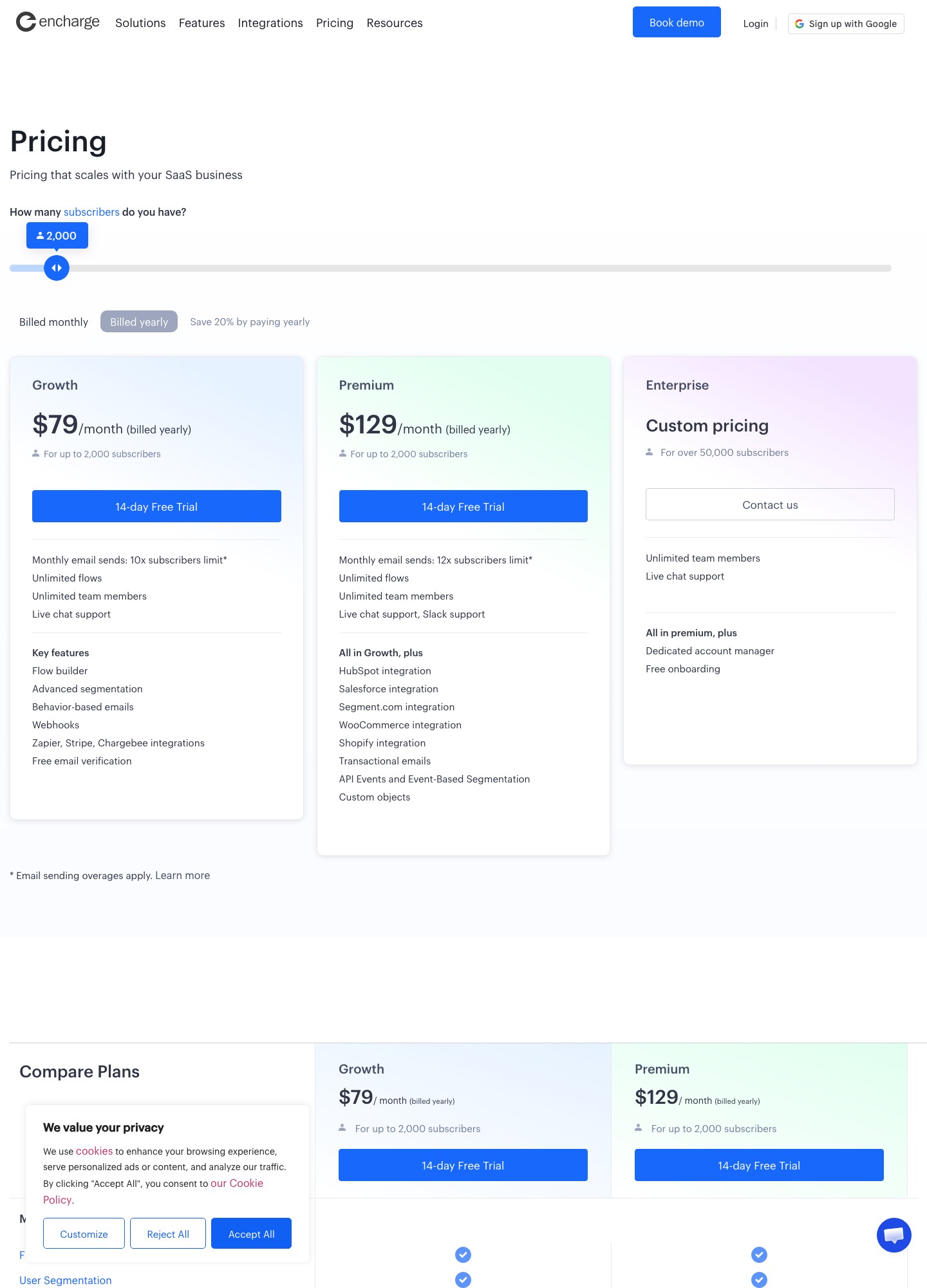
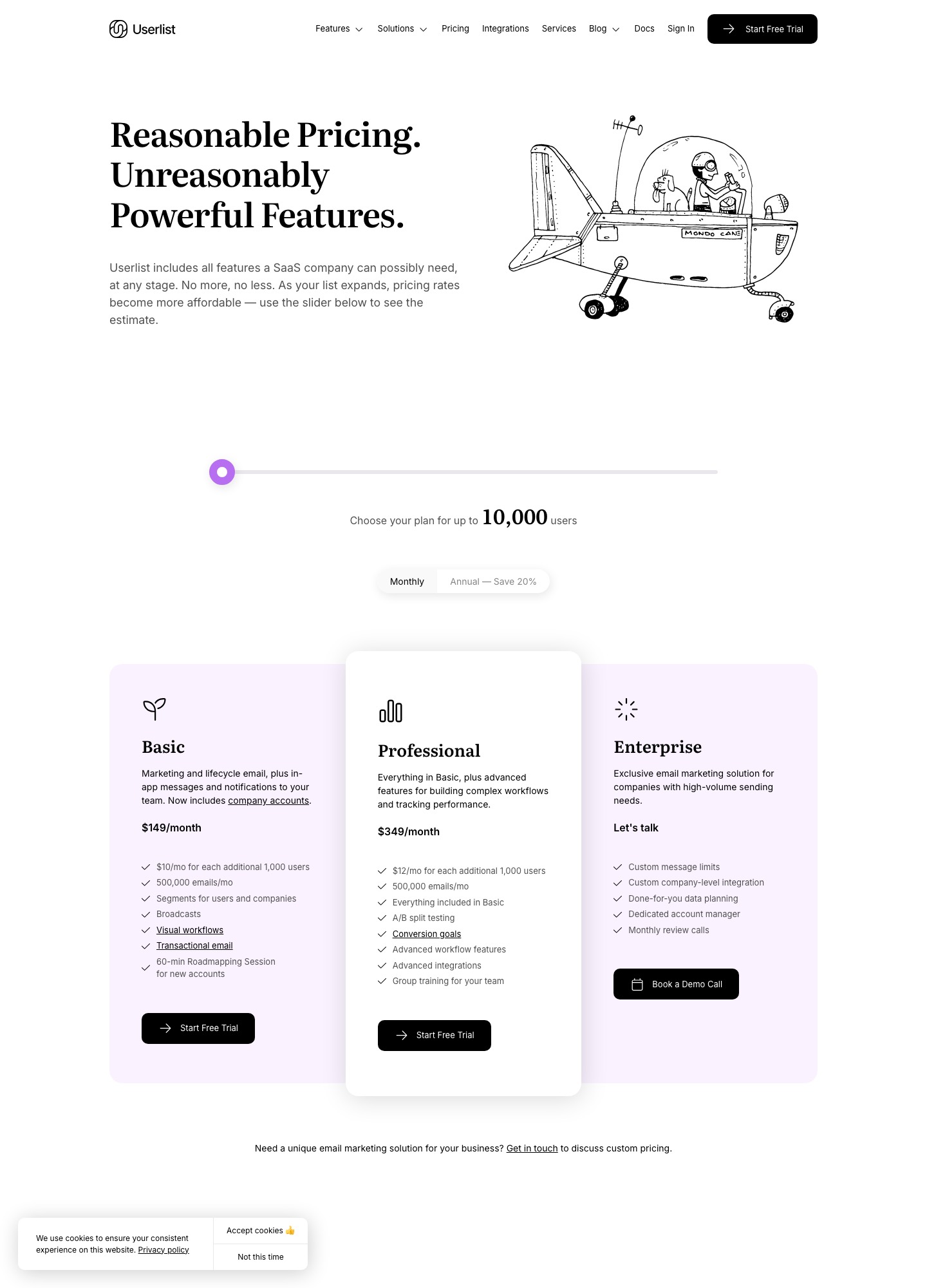
Userlist Professional is $50 below Encharge Premium at 10,000 users and $120 below at 25,000. Userlist shows an annual toggle labelled "Save 20%"; Encharge's yearly price is $79 for Growth and $129 for Premium at 2,000 subscribers. Neither lists a free plan. Encharge shows a 14-day free trial and Userlist a free-trial button.
What is in each plan
- Userlist Basic lists marketing and lifecycle email, in-app messages, broadcasts, visual workflows, transactional email, segments for users and companies and a 60-minute roadmapping session. Professional adds A/B split testing, conversion goals, advanced workflow features, advanced integrations and group training for your team.
- Userlist limits are described in its billing docs: a monthly allowance of 5 times your tracked users with a 500,000-message floor, and $1 per 1,000 messages beyond it (Userlist billing).
- Encharge Growth lists a monthly send ceiling of 10 times subscribers, unlimited flows and team members, behavior-based emails, advanced segmentation, webhooks and Zapier, Stripe and Chargebee integrations. At 10,000 subscribers the ceiling is 100,000 sends against Userlist's 500,000 messages, with Encharge's overage at $100 per 100,000 emails.
- Encharge Premium adds HubSpot, Salesforce, Segment, WooCommerce and Shopify integrations, transactional email, API events with event-based segmentation, custom objects and Slack support.
Accounts versus individuals
Userlist's pricing page says its Basic plan now includes company accounts, and its integrations page describes native Segment and RudderStack connections and code libraries for Ruby, Rails, PHP, Laravel and JavaScript. The model is built for B2B SaaS where "the customer" is a company: a trial can belong to an account, and a message can depend on what several users there have done. Encharge is organized around people, events and flows, with custom objects only on Premium. If you sell per-seat plans to teams, test how each represents the company before you test anything else.
Billing events
- Encharge lists twelve Stripe triggers (trial started, trial ends, trial converted, trial expired, subscription activated, past due, reactivated, scheduled cancellation, cancelled, expanded, contracted, new payment), imports historical billing data when connected, and names Chargebee, Chargify, Recurly and Paddle in its integration list (Encharge for Stripe).
- Userlist files Stripe and Chargebee under Billing and Churn Buster and Stunning under Payment Recovery. It states that most integrations are available from Basic and some are restricted to Professional, with no extra charge for integrations (Userlist integrations and its Stripe page). Its Stripe listing does not itemize the synced events, so ask which of trial ending, past due and cancelled it carries and on which plan.
Moving between them
- Export people with attributes, plus a company or account identifier if you have one, because Userlist's model is organized around companies and you will want that link present at import.
- Carry unsubscribed and bounced status across, and import those people as suppressed.
- Send the same set of product events to both for a week before rebuilding flows.
- Rebuild onboarding first, then trial-ending and failed-payment flows, and keep old flows live until a trial cycle has completed.
- Move SPF and DKIM records for the sending domain last.
The decision
- Userlist Basic if you have 5,000 or more users, sell to companies, and want in-app and transactional messages included.
- Encharge Growth if you have under about 3,000 subscribers, or your priority is named Stripe or Chargebee triggers.
- Encharge Premium if the CRM sync matters more than the $50 to $120 it costs over Userlist Professional.
Related reading: all comparisons, Vero vs Userlist, Vero vs Encharge, Loops vs Userlist, Drip vs Userlist and tools for B2B SaaS.
Encharge vs Userlist: common questions
When does Userlist become cheaper than Encharge?
Somewhere between 2,000 and 5,000 subscribers. Encharge Growth is $99 at 2,000 and $179 at 5,000, while Userlist Basic is $149 for anything up to 10,000 users. From 5,000 up, Userlist is cheaper: $30 less at 5,000, $100 less at 10,000, and $90 less at 25,000 ($299 against $389, using Userlist's $10 per extra 1,000 users).
Does either include transactional email?
Userlist lists transactional email in its Basic plan. Encharge lists transactional emails on Premium, not on Growth. For a SaaS that wants password resets and receipts on the same platform, that moves the like-for-like comparison to Userlist Basic ($149 at 10,000) against Encharge Premium ($399).
How does each model companies and accounts?
Userlist's Basic plan lists segments for users and companies and says it now includes company accounts. Encharge Premium lists custom objects and API events with event-based segmentation, but its pricing page does not describe a user-to-company model, so ask for a demo of your own account structure.
Which has the richer Stripe handling?
Encharge's Stripe page lists twelve triggers, including trial ends, subscription past due and cancelled, and imports historical billing data. Userlist's integrations page lists Stripe and Chargebee under Billing and links a Zapier guide without itemizing synced events, so confirm the exact event list with Userlist before choosing it for dunning flows.