HubSpot vs Pardot: four Salesforce editions against HubSpot's two paid rungs
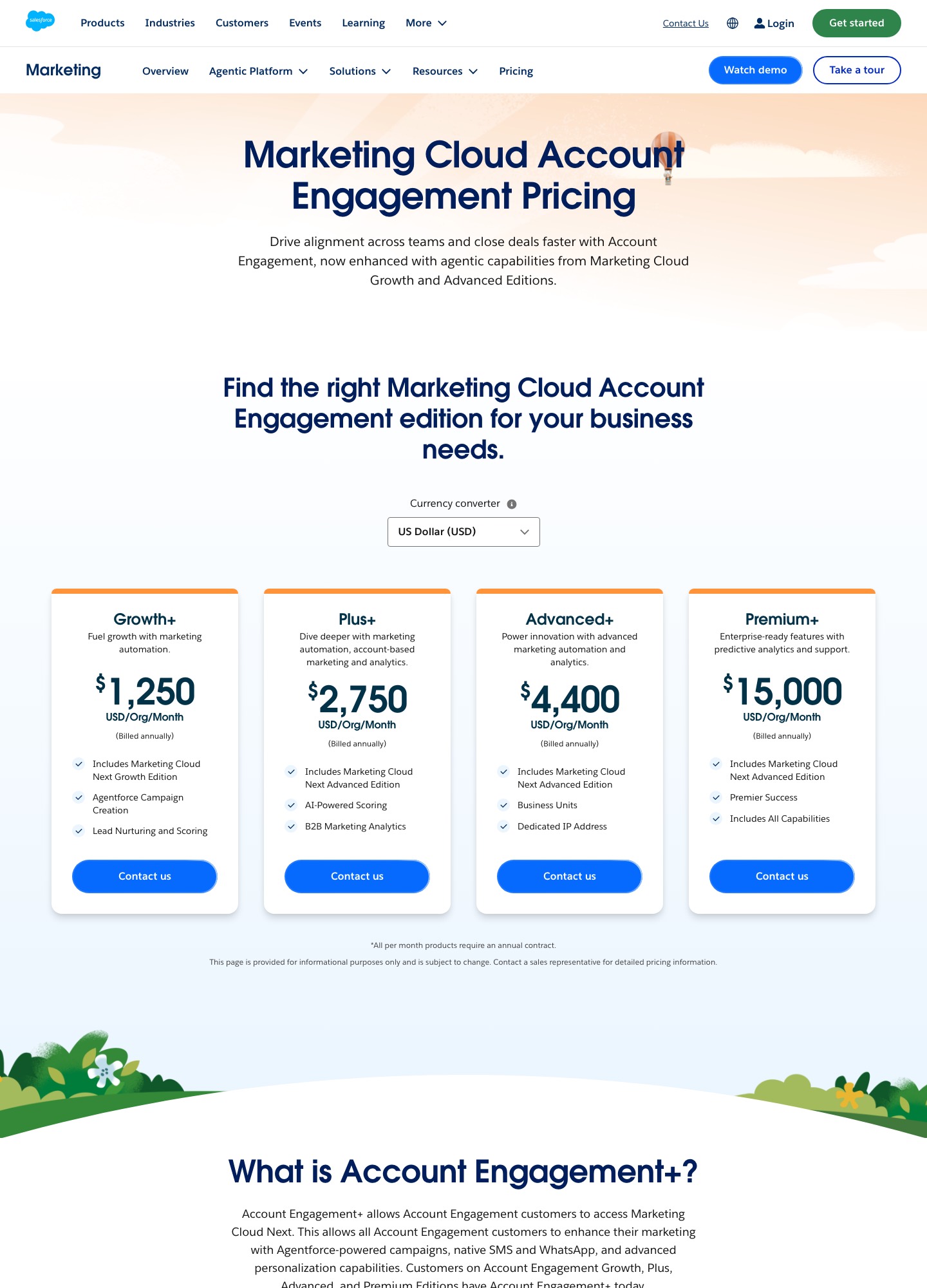
Pardot is now sold as Salesforce Account Engagement, with four editions priced per organisation per month on annual billing: Growth+ at $1,250, Plus+ at $2,750, Advanced+ at $4,400 and Premium+ at $15,000. HubSpot Marketing Hub lists Professional at $800 and Enterprise at $3,600. HubSpot is cheaper at every comparable rung, and Pardot's case rests on the Salesforce sync, not the price.
By Julian Pryor · Updated 7 Oct 2026
Short answer
If Salesforce is already where your sales team lives, Account Engagement Growth+ at $1,250 a month is the natural starting point and the $450 monthly premium over HubSpot Professional buys a native sync. If you are not on Salesforce, HubSpot Professional at $800 gives you unlimited automation actions and a CRM in the same product, and you can revisit Pardot only if Salesforce becomes your system of record.
Edition by edition
| Edition | Price per month, billed annually | Contacts included | Automation rules | API calls a day | Per year |
|---|---|---|---|---|---|
| Growth+ | $1,250 | 10,000 | 50 | 25,000 | $15,000 |
| Plus+ | $2,750 | 10,000 | 100 | 50,000 | $33,000 |
| Advanced+ | $4,400 | 10,000 | 150 | 100,000 | $52,800 |
| Premium+ | $15,000 | 75,000 | 150 | 100,000 | $180,000 |
Source: Salesforce Account Engagement pricing, read on 7 October 2026 in USD. The page notes that per-month products require an annual contract. Beyond the editions, it lists add-ons: Advanced Dynamic Content at $400 a month, Advanced Email Analytics with rendering and preview analysis at $400, Custom Object Integration at $400 and a Dedicated IP Address at $500. Forms and landing pages are capped at 50 on Growth+ and unlimited from Plus+; Advanced+ includes 2 business units and Premium+ includes 5.
Against HubSpot, rung by rung
| Closest rungs | Pardot | HubSpot Marketing Hub | Pardot premium per month | Per year |
|---|---|---|---|---|
| Entry paid | Growth+ $1,250 | Professional $800 | $450 | $5,400 |
| Upper | Advanced+ $4,400 | Enterprise $3,600 | $800 | $9,600 |
| Small seat count | Growth+ $1,250 | Starter $7 a seat | Not like for like | Not like for like |
HubSpot's figures are from its Marketing Hub pricing page, which also says pricing is per seat, so seat counts and contact tiers may move your HubSpot total. Pardot's per-contact rate also rises as you climb. Divide each price by its included contacts and Growth+ is $0.125 a contact a month, Plus+ is $0.275 and Advanced+ is $0.44, with Premium+ coming back to $0.20 once it includes 75,000. The edition that gives you automation rules and API headroom is not always the one that gives you the cheapest contacts.
Counting rules against workflows
Pardot's automation limit is a number of rules: 50 on Growth+, 100 on Plus+, 150 above. HubSpot's table for Marketing Hub counts differently: email automation is 1 action on Free, up to 10 on Starter, and unlimited on Professional with omni-channel automation of up to 300 workflows for 10 teams. Enterprise lists up to 1,000 workflows for 300 teams plus behavioral events. A rule and a workflow are not the same unit, so count what you actually plan to build before trusting either number. A SaaS lifecycle of trial start, trial ending, payment failed, upgrade, downgrade and cancel, with two plan variants each, is about a dozen automations, which sits comfortably inside 50 rules.
Billing data and Salesforce objects
For a SaaS company, the question is where subscription state lives. If invoices, plans and renewal dates are objects in Salesforce, Pardot needs a way to read them, and its pricing page prices that as Custom Object Integration at $400 a month beside the Plus+ column. That puts the real cost of a billing-aware Plus+ at $2,750 + $400 = $3,150 a month, or $37,800 a year, before a dedicated IP at another $500. If subscription state lives in your product database and billing provider instead, the daily API budget matters more: 25,000 calls a day on Growth+ is about 1,041 an hour, and a handler that makes two calls per billing event tops out near 12,500 events a day.
On the HubSpot side, workflows start from enrollment triggers, so the usual pattern is for your billing system to write a property on the contact and for a workflow to react to it. Enterprise adds behavioral events and predictive lead scoring.
How the add-on lines stack up
Account Engagement's edition price is not the whole bill, because several capabilities sit on separate $400 and $500 lines. Taking Plus+ and adding only the lines a SaaS team is likely to ask about:
| Build | Sum per month | Per year |
|---|---|---|
| Plus+ alone | $2,750 | $33,000 |
| Plus+ with Custom Object Integration | $2,750 + $400 = $3,150 | $37,800 |
| Plus+ with Custom Object Integration and Dedicated IP | $3,150 + $500 = $3,650 | $43,800 |
| Plus+ with Dynamic Content, Email Analytics and Custom Object Integration | $2,750 + $400 + $400 + $400 = $3,950 | $47,400 |
The $3,650 build is $50 a month above HubSpot Enterprise's listed $3,600, which shows how an edition that looks cheaper on its headline can reach the next HubSpot tier once add-ons are counted. SMS and WhatsApp are also listed as add-ons, with no price on the page. Before you sign, ask the Salesforce representative three things: what an extra block of contacts costs once you pass the included 10,000, which of these add-ons your use case really needs, and whether the annual contract auto-renews at the same rate.
Who should choose which
- Pardot Growth+ or Plus+ fits a B2B SaaS company with Salesforce as the CRM, a sales team that expects lead data to land in Salesforce natively, and a budget that treats $15,000 to $33,000 a year as normal.
- Pardot Advanced+ or Premium+ fits multi-brand or multi-region organisations that need business units and 100,000 API calls a day.
- HubSpot Professional fits a marketing team that wants the marketing platform and the CRM in one place at $800 a month and does not have a Salesforce commitment.
- HubSpot Enterprise fits a larger team that wants behavioral events and hundreds of workflows at $3,600 a month, still below Advanced+.
Moving from Pardot to HubSpot, or the other way
- Export prospects and contacts with scores, grades and activity, and write the scoring model down in plain terms.
- Decide which system owns the lifecycle stage. If both sync to the same CRM, run only one sync at a time.
- Rebuild forms, landing pages and email templates, and redirect old landing page URLs.
- Move automations in order of revenue risk, starting with the failed-payment and trial-ending flows, and retire the old ones after a full billing cycle.
Related reading: HubSpot vs Marketo, HubSpot vs Keap, tools for enterprise teams, enterprise SaaS tool selection, the marketing automation category and the comparison index.
HubSpot vs Pardot: common questions
Is Pardot more expensive than HubSpot?
On list prices, yes. Salesforce lists Account Engagement Growth+ at $1,250 per org per month billed annually, against HubSpot Marketing Hub Professional at $800 a month, a gap of $450 a month or $5,400 a year. At the next rung, Advanced+ at $4,400 is $800 a month above HubSpot Enterprise at $3,600, which is $9,600 a year. The units differ, though: Pardot prices per organisation with 10,000 contacts included, HubSpot per seat.
How many contacts does Pardot include?
Growth+, Plus+ and Advanced+ each include 10,000 contacts, and Premium+ includes 75,000. Divide the monthly price by contacts and the rate is $0.125, $0.275, $0.44 and $0.20 per included contact per month. The pricing page does not state what extra contact blocks cost, so ask for that before you size an edition.
What are the limits that make teams move up an edition?
Automation rules rise from 50 on Growth+ to 100 on Plus+ and 150 on Advanced+ and Premium+. Forms and landing pages are capped at 50 on Growth+ and unlimited from Plus+. API calls per day go from 25,000 to 50,000 to 100,000. Business units start at 2 on Advanced+ and reach 5 on Premium+.
Do I need Salesforce to use Pardot?
Pardot's pricing page lists a native CRM integration with Salesforce, so a team without Salesforce pays for an integration it will not use. If your CRM is HubSpot or something lighter, price Marketing Hub first and use Pardot as the comparison only if Salesforce is, or soon will be, your system of record.