Intercom vs Customer.io: a per-seat help desk against a per-profile messaging engine
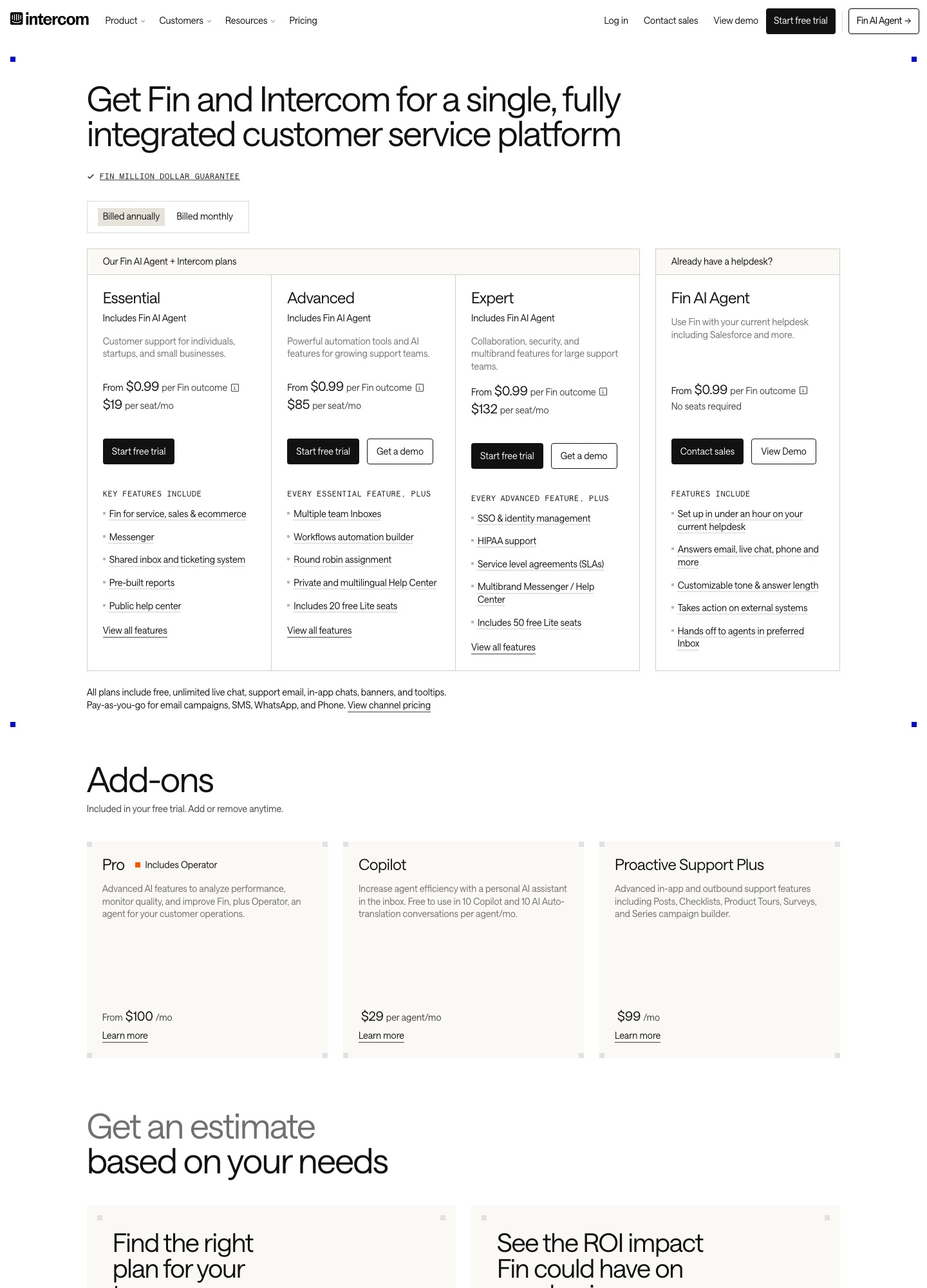
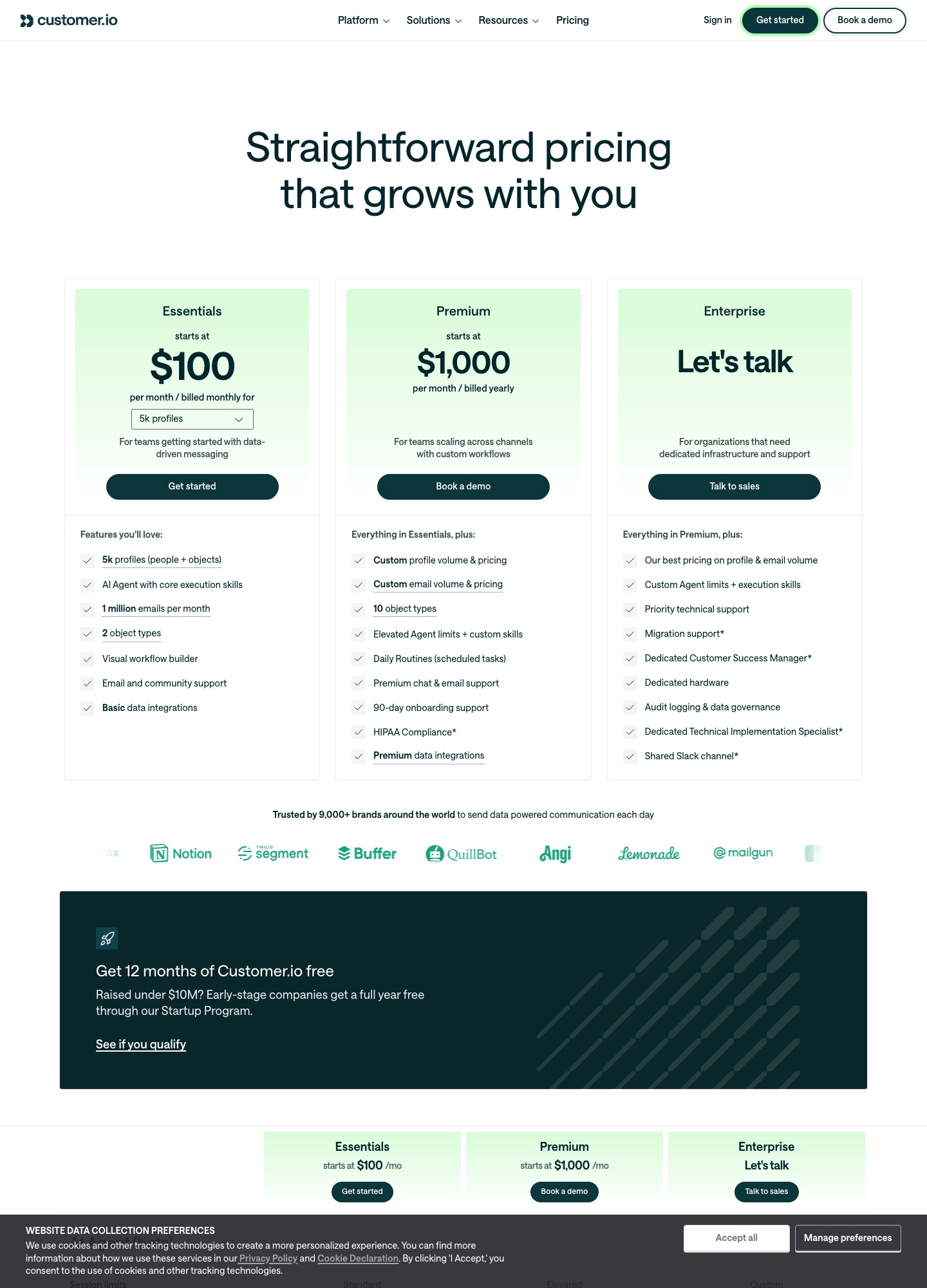
Intercom is priced by the teammate: $19, $85 or $132 per seat a month depending on plan, with usage charges on top. Customer.io is priced by the profile: $100 a month at 5,000 profiles, $145 at 10,000, $235 at 20,000. They overlap on in-product and email messaging, but one is built around answering customers and the other around reacting to what they do, so most SaaS teams are choosing which job to hand to which tool.
By Julian Pryor · Updated 7 Oct 2026
Short answer
If agents answer customers all day and you want chat, tickets and an AI agent in one inbox, buy Intercom and budget by seat. If your priority is onboarding, trial-ending, payment-failed and win-back sequences driven by product and billing events, buy Customer.io and budget by profile. Running both is common: Intercom for conversations, Customer.io for the automated lifecycle, with a rule on which tool owns each message.
How each one charges
| Item | Intercom | Customer.io |
|---|---|---|
| Unit | Per teammate seat, plus usage | Per profile (people and objects), plus email volume |
| Entry | Essential $19 per seat a month, annual billing | Essentials $100 a month for 5,000 profiles, billed monthly |
| Middle | Advanced $85 per seat, includes 20 free Lite seats | $145 at 10,000 profiles; $235 at 20,000; $325 at 30,000 |
| Top self-serve | Expert $132 per seat, includes 50 free Lite seats | $415 at 40,000; $505 or more at 50,000+; Premium from $1,000 a month billed yearly |
| Usage charges | Fin AI agent at $0.99 per outcome; email campaigns charged per bulk email sent; SMS, WhatsApp and phone pay as you go | $0.009 per extra profile; $0.12 per extra 1,000 emails |
| Trial or free offer | 14-day trial, no card required | 12 months free for companies that have raised under $10M, through its Startup Program |
Sources: Intercom pricing and Customer.io pricing, read on 7 October 2026. Intercom also sells Proactive Support Plus at $99 a month including 500 messages, for in-product and outbound support messages.
Three SaaS stacks, priced
These sums put a support team on Intercom seats and a lifecycle audience on Customer.io profiles. Intercom email campaigns and Fin usage are left out, since the first has no per-email price on the page I read and the second depends on volume.
| Stack | Intercom seats | Customer.io profiles | Both per month |
|---|---|---|---|
| Early: 3 agents, 5,000 profiles | 3 x $19 = $57 | $100 | $157 |
| Growing: 6 agents on Advanced, 10,000 profiles | 6 x $85 = $510 | $145 | $655 |
| Scaled: 15 agents on Advanced, 50,000 profiles | 15 x $85 = $1,275 | $505 or more | $1,780 or more |
Seat cost dominates the larger stacks: at 15 agents on Expert the seats alone are 15 x $132 = $1,980. Customer.io's slope is gentler. From 10,000 to 20,000 profiles it adds $90, which matches $0.009 times 10,000, so a profile costs under a cent. Two details change the bill. Customer.io counts a profile if it existed at any point in the billing month, even if you delete it, so a clean-up in the middle of the month does not lower that month's bill. And Intercom's Fin charge is separate: 500 outcomes cost $495.
Different jobs, different shapes
Intercom's Essential plan lists a Messenger, a shared inbox and ticketing system, pre-built reports and a public help center. Advanced adds a workflow automation builder, multiple team inboxes and round-robin assignment. Expert adds SSO, HIPAA support, SLAs and multibrand support. That is a customer service platform with messaging attached.
Customer.io's Essentials plan lists a visual workflow builder, an AI agent with core execution skills and basic data integrations, with email, push, in-app messaging, SMS and WhatsApp as channels. Its Premium plan adds custom profile and email volume, 10 object types against 2 on Essentials, scheduled daily routines and HIPAA compliance. It is a messaging and automation platform with no help desk.
Where SaaS billing events go
Customer.io's Track API takes identify calls and events, with a stated rate of 1,000 requests per second and separate US and EU endpoints. In practice you receive a billing webhook such as a failed payment, write it to Customer.io as an event on that person, and a workflow sends the dunning sequence, waits, checks whether the invoice is paid and exits. Intercom's REST API reference has a Data Events section for the same kind of input, and its Messenger and Advanced workflows can then route a human conversation.
The risk to design out is double messaging. If your billing provider already emails a failed-payment notice, and Intercom and Customer.io can both email the same customer, choose one owner for payment-failed copy and suppress the others by an attribute such as dunning_owner. Intercom also lists Salesforce, HubSpot and Freshdesk among its integrations.
What each plan leaves out
- Intercom Essential does not include the workflow automation builder, multiple team inboxes or round-robin assignment; those start at $85.
- Customer.io Essentials does not include managed deliverability, custom profile and email volume pricing, or premium chat and email support; the comparison table marks managed deliverability as not included on Essentials and included from Premium.
- Both charge for usage beyond the plan: Fin outcomes and campaign emails on Intercom, extra profiles and extra email blocks on Customer.io.
Which to choose
- Intercom fits a support-led SaaS with 3 or more agents, in-product chat, a help center and an interest in an AI agent.
- Customer.io fits a product-led SaaS whose growth team needs event-triggered onboarding, trial and dunning flows and does not need a help desk.
- Both fit a company with a real support team and a lifecycle program, provided one tool owns each message.
Moving lifecycle email from Intercom to Customer.io
- Export people and companies from Intercom with their attributes and unsubscribe status.
- Send product and billing events to Customer.io through its Track API before you rebuild any flow, so segments have data.
- Rebuild one sequence at a time, trial ending first, and run it on a test segment against the old one.
- Keep Intercom for conversations and remove its outbound campaigns only once the new ones have run a full billing cycle.
Related reading: Intercom vs HubSpot, Intercom vs Drift, Customer.io vs HubSpot, Zendesk vs Intercom, Intercom alternatives and the comparison index.
Intercom vs Customer.io: common questions
Can Customer.io replace Intercom?
Only for the messaging half. Customer.io's Essentials plan lists a visual workflow builder, email and in-app messaging, push, SMS and WhatsApp, but it is not a help desk with a shared inbox, ticketing and a public help center, which are the things Intercom's Essential plan lists. Teams that need agents answering customers usually keep a desk and use Customer.io for the automated lifecycle messages.
Why is Intercom priced per seat and Customer.io per profile?
Because they are sold for different jobs. Intercom's page says you pay per teammate, by plan, plus usage such as Fin outcomes and messaging channels. Customer.io's Essentials plan starts at $100 a month for 5,000 profiles and rises with the profile count, for example $145 at 10,000 and $235 at 20,000, so cost follows audience size, not headcount.
What does Intercom's AI agent cost?
Fin is priced at $0.99 per outcome on top of seats, according to Intercom's pricing page. At 500 outcomes in a month that is $495, and at 2,000 outcomes it is $1,980. Fin can also be bought without seats if you already run another helpdesk.
Does Customer.io send transactional email?
Yes. Its comparison table lists transactional emails as included on every plan, and Essentials includes 1 million emails a month. The same table shows managed deliverability as not included on Essentials, so a team with deliverability worries should price Premium, which starts at $1,000 a month billed yearly.